47 Clips. Friday Deadline. Zero Keyframing.
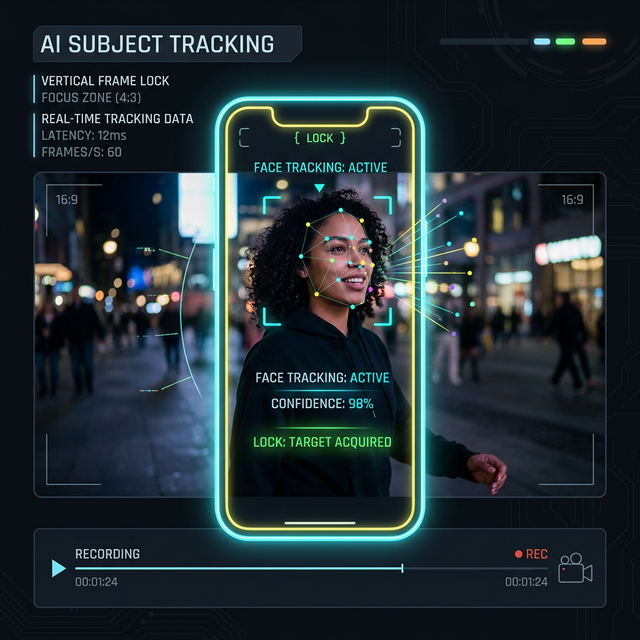
Your source footage is 16:9. TikTok, Reels, and Shorts want 9:16. You have 47 clips to reframe by Friday. Onset Engine detects faces during ingest and uses their positions to intelligently place the crop window — keeping subjects centered without a single manual keyframe.
The Problem
You shot a podcast interview, a talking-head YouTube video, or a music performance in 16:9. Now you need vertical clips for TikTok, Reels, and Shorts. The subject keeps moving — left, right, leaning forward, gesturing off-screen.
A dumb center-crop cuts off the speaker's face half the time. Auto-reframe tools in cloud apps upload your footage to remote servers. Manually keyframing the crop window for every clip is a multi-hour nightmare.
Smart Crop Pipeline
During ingest, Onset Engine extracts a representative peak frame from every clip segment. The face_center coordinates are stored in the database, and the VFX pipeline uses these positions to place the 9:16 crop window intelligently.
- ✓ Face Detection at Ingest: Face positions stored per-clip — no re-analysis needed at render time
- ✓ Vertical Mode Options: "blur" (blurred pillarbox), "crop" (smart face-centered trim), or "stretch"
- ✓ Prestige Preset: Combines face-aware crop with cinematic letterboxing and teal-and-orange grading
- ✓ Triptych Mode: 3-panel vertical layout (1920×1080) for multi-angle interview content
- ✓ 100% Local: No footage uploaded anywhere. Face detection runs on your GPU
Use Cases
🎙️ Podcast Clips
Multi-person podcast interviews. The crop window follows the active speaker. Export 9:16 clips for social promotion without re-editing in Premiere.
🎤 Live Music
Concert footage with moving performers. Face tracking keeps the vocalist centered even as they move across the stage. Beat-synced cuts between angles.
📹 YouTube → Shorts
Repurpose existing 16:9 YouTube content as 9:16 Shorts. The AI selects the highest-motion segments and crops them with face awareness automatically.
💒 Wedding Films
Ceremony and reception footage reframed for Instagram Reels. The crop keeps the couple centered. The Prestige preset adds cinematic color grading.
Why Not Premiere Pro's Auto-Reframe?
Premiere Pro's Auto-Reframe requires an active $55/month Creative Cloud subscription ($660/year). It processes one clip at a time. It doesn't understand musical context — it can't sync crop movements to beats. And for 47 clips? You're running Auto-Reframe 47 times manually.
Onset Engine combines face-aware cropping with beat-synced editing in a single pipeline. Select your footage, drop in a track, choose your preset, and get a fully beat-synced vertical edit with intelligent face tracking. One render. One pipeline. No subscription. All 47 clips, one button.

Ready to Try It?
Download the free demo and see the results on your own footage. One-time purchase, no subscriptions.