Does DaVinci Resolve Detect Beats?
It depends on which version you have:
- DaVinci Resolve Studio 20 and later (the paid version) has beat detection. Right-click the music clip on the timeline and choose the music beats option (Show Music Beats; some versions call it Detect Music Beats). Resolve analyzes the song, shows the beats on the clip, and edits snap to them.
- The free version doesn't include it, so you add markers yourself or import them.
Either way, Resolve marks beats but not bars. It doesn't say which beat starts a bar, so finding the drop or the chorus is still up to your ear.
Option 1: Tap Markers In (Free and Studio)
- Put the song on the timeline on the Edit page, and click an empty part of the timeline so no clip is selected. With a clip selected,
Mmarks that clip instead of the timeline. - Play from the start and press
Mon every beat. Resolve adds a timeline marker at the playhead each time, without stopping playback. - Make the audio track taller to see the waveform, and drag any marker that landed early or late onto the start of the drum hit.
A 3-minute song at 120 BPM has about 360 beats. For slower edits, tap only the first beat of each bar.
Option 2: Import a Timeline With Every Beat Marked (Free and Studio)
Onset Engine finds every beat and bar start in a song and writes a timeline file Resolve opens with a marker on each one. It's free in the Demo, and it works in the free version of Resolve:
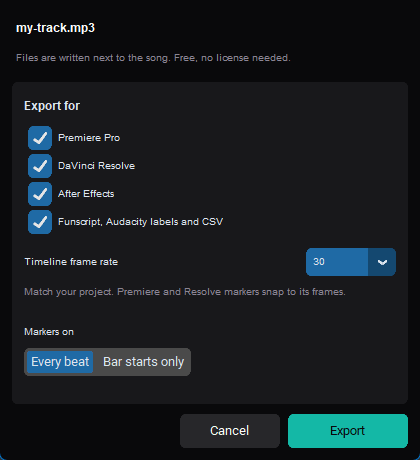
- Add your song in Onset Engine's AUDIO tab and click ⇩ BEATS.
- Tick DaVinci Resolve, set Timeline frame rate to your project's frame rate, and choose Every beat or Bar starts only.
- In Resolve, choose File → Import → Timeline and pick the
_beats.xmlfile written next to the song. It opens as a new timeline with the song and a marker on every beat.
Each marker is named by bar and beat: 12.3 is the third beat of bar 12, and bar starts end in .1. That's the part Resolve's own detection doesn't give you: you can see where each bar, and so each section of the song, begins.
Cutting to the Markers
- Turn on snapping with
N. Clip edges and the playhead jump to markers as you drag. - Move between markers with
Shift+Up Arrow andShift+Down Arrow, and cut at the playhead withCtrl+B. - Change shots on bar starts and use the beats in between for accents: a punch-in, a flash, a speed ramp. Cutting on every beat for a whole song gets tiring to watch.
- Hit the drop on the first beat of its bar. If the drop is at bar 33, the marker named
33.1is your biggest cut.
Tips for Beat Markers in Resolve
- Match the frame rate. Resolve places markers on whole frames, so set the export to your timeline's rate (for example 29.97, not 30).
- Beats fall between frames. At 128 BPM and 25 fps a beat is 11.72 frames. Markers sit on the frame nearest each beat, which is within half a frame. The BPM to FPS calculator shows the exact numbers.
- Steady music detects best. Songs with a clear, steady beat mark cleanly in any tool. Free-tempo or beatless music has no grid to find.
Or Start From a Finished Cut
Markers speed up an edit you cut yourself. Onset Engine can also build the whole beat-synced edit from your own footage, matching calm shots to quiet passages and high-motion shots to the drop. Render it directly, or on Studio export the timeline as an .xml and finish it in Resolve. See how to sync video clips to music automatically.
DaVinci Resolve Beat Marker Questions
Does DaVinci Resolve have beat detection?
DaVinci Resolve Studio 20 and later, the paid version, can show the beats of a music clip on the timeline and snap edits to them. Right-click the music clip on the timeline to find it. It marks beats but not bar starts, and the free version doesn't include it.
How do I add beat markers in the free version of DaVinci Resolve?
Play the timeline and press M on each beat to add timeline markers, then fix any that landed off the beat against the waveform. Or import a timeline that already has a marker on every beat, with File > Import > Timeline, which the free version supports.
How do I make clips snap to beat markers in Resolve?
Turn on snapping with N. Clip edges and the playhead then jump to markers as you drag, so each cut lands on a beat.
How do I find the drop or the chorus quickly?
Use markers that are named by bar. If every marker says its bar and beat, the first beat of bar 33 is easy to spot on the timeline and in the marker list, without scrubbing through the song.
Onset Engine runs on Windows. The timeline file is a plain file, so you can carry it to a Mac too; if Resolve shows the song as offline, relink it to the file.