Music Video Editor - Your Track Drives the Edit
Traditional music video editing means placing 400+ beat markers and matching clips to each one by hand. Onset Engine reads your actual audio - beats, onsets, drops, and bass/mid/high energy - and sequences your visuals to match. A complete first cut in minutes.
Music Video Editing Is Beat-Sync at Scale
A music video is fundamentally a beat-sync problem. Every visual transition should align with a musical event - a kick triggers a cut, a snare drives a transition, a drop demands the most dramatic visual in your library.
In Premiere Pro, this means: import your track, listen through the entire song placing beat markers (400+ for a 4-minute track), then manually find and place clips at each marker. For one song, this is 8–40 hours of work depending on complexity.
Onset Engine automates the entire pipeline - from audio analysis to clip selection to final assembly - using AI that actually understands both the music and the visuals.

How It Works for Music Videos
- ✓ Sub-Band Audio Analysis: Beat detection maps beats, onsets, and bass/mid/hi energy bands - not just BPM - so cuts and effects react to kicks (bass), vocals (mid), and hi-hats (highs). Every cut is timed to a real musical event
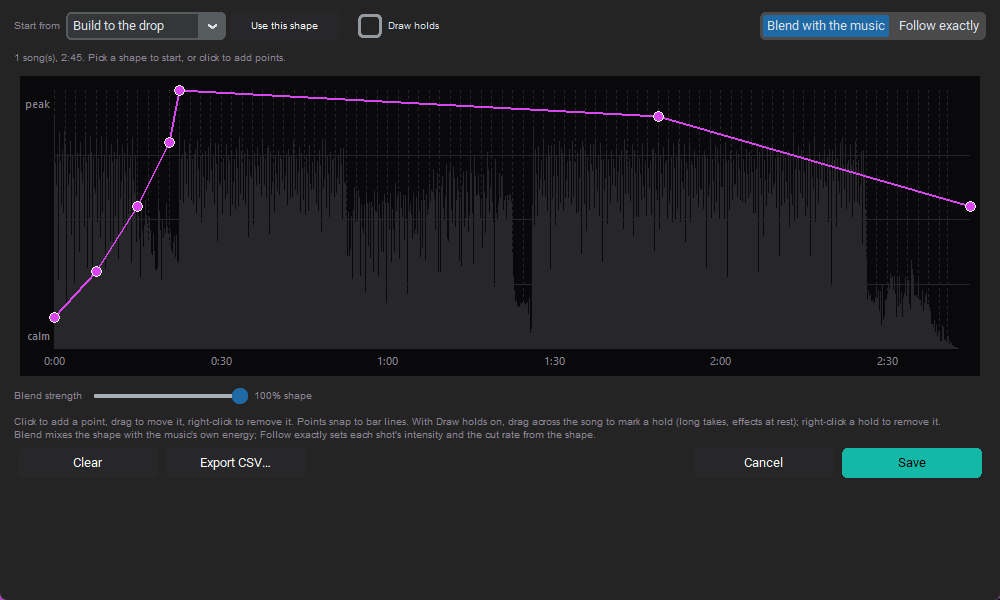
- ✓ Energy-Mapped Sequencing: Calm visuals for intros and verses. High-intensity clips for choruses and drops. The video breathes with the music
- ✓ Visual AI: The AI understands what's in your clips semantically - "dramatic close-up" vs. "wide landscape" - and sequences them for visual variety
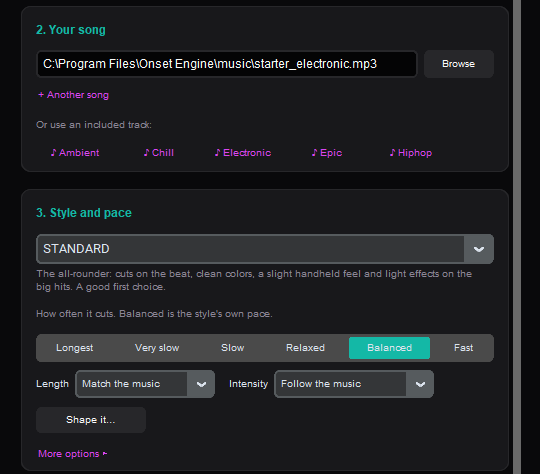
- ✓ Style Presets: AGGRESSIVE for trap/phonk, HYPNOSIS for lo-fi/dreamy, PRESTIGE for cinematic, STANDARD for clean cuts
- ✓ Multi-Format Export: Render 16:9 for YouTube, 9:16 for TikTok/Reels, and 8-second loops for Spotify Canvas - three assets from one session
Music Video Workflow
Build a Visual Library
Collect your footage: performance clips, B-roll, 3D loops, abstract motion, stock footage. Ingest once - reuse across every release.
Load Your Track
Drop your master WAV or MP3. The audio engine maps every musical event - beats, onsets, energy contours, section changes.
Choose a Preset
Each preset defines the visual language: transition style, pacing, VFX intensity, and color grade. Match it to your genre.
Render All Formats
YouTube (16:9), TikTok/Reels (9:16), Spotify Canvas (8s loop). Three platform-ready assets from one edit session.
For Musicians, Producers, and Visual Artists
Whether you're an indie artist releasing singles weekly, a Type Beat producer who needs visuals for every upload, or a VJ building performance content - Onset Engine handles the video editing so you can focus on the music. Even if you're working with zero budget, you can make a music video with no budget using your existing footage library.
Build your visual library once. Every new track generates a unique, beat-synced music video from the same source material. Different beats produce different clip selections, different sequencing, and different energy curves.
One-time purchase from $29.99. $0 per video. No animator fees, no cloud processing, no subscription. Your visuals, your track, your machine.
Frequently Asked Questions
What is the best software for editing music videos?
For manual timeline editing, Adobe Premiere Pro and DaVinci Resolve are industry standards - they give you frame-level control over every cut, transition, and effect. For automated beat-synced music videos, Onset Engine uses visual AI and beat detection to sequence clips to every beat, onset, and drop in your track, producing a complete first cut in minutes. The two approaches complement each other: Onset Engine can generate an initial assembly and export it as an .otio timeline that opens directly in Premiere Pro or DaVinci Resolve for color grading, title overlays, and final polish.
How to sync video to music automatically?
Onset Engine automates the entire music-to-video sync process using AI beat and downbeat detection. When you load a track, the engine detects individual beats, onsets, energy curves, BPM, and section boundaries - building a complete temporal blueprint of your music. It then matches clips from your library to each musical event: high-energy footage lands on drops, calm visuals fill intros and breakdowns. You choose a preset to control pacing style (AGGRESSIVE for rapid cuts on every beat, STANDARD for balanced editing, PRESTIGE for cinematic holds). No manual beat markers, no keyframing - the AI maps every rhythmic element automatically and renders a complete beat-synced edit.
Is there a free music video editor?
DaVinci Resolve offers a powerful free tier for manual timeline editing with professional color grading tools. For AI-powered automatic music video creation, Onset Engine provides a free demo that runs the full pipeline - all 9 presets, AI clip analysis, New video (a full-song draft cut to the beat, opened in the Editor), and v3 Driver pacing - on your own clips and tracks. The demo renders at 720p with a watermark so you can evaluate the AI's clip selection and beat-sync quality before purchasing. The full version is a one-time purchase: $29.99 for Core (1080p) or $59.99 for Studio (4K + OTIO export) with the current launch discount. No subscription, no per-render fees.
What do music video editors use?
Professional music video editors typically use Adobe Premiere Pro or DaVinci Resolve for manual timeline work - these NLEs provide frame-accurate editing, advanced color grading, and plugin ecosystems. Onset Engine complements these tools by handling the most time-consuming part of music video editing: the initial assembly. Its AI analyzes what's in each clip and maps clips to your track's beat structure, generating a complete first cut in minutes. You can then export the timeline as an .otio (OpenTimelineIO) file that opens in Premiere Pro or DaVinci Resolve with all clip references and in/out points preserved for manual refinement.
Ready to Try It?
Download the free demo and see the results on your own footage. One-time purchase, no subscriptions.