BeatEdit Alternative: Free Beat Markers, Plus Full Beat-Synced Edits
BeatEdit puts beat markers on your Premiere timeline. Onset Engine's free demo exports beat markers for Premiere Pro, DaVinci Resolve and After Effects - and when you'd rather not cut by hand, it builds the whole beat-synced edit from your clips.
| BeatEdit for Premiere Pro | Onset Engine | |
|---|---|---|
| Beat markers | On your Premiere Pro timeline | For Premiere Pro, DaVinci Resolve and After Effects |
| Price for markers | $99.99 | Free in the demo |
| Works with | Premiere Pro (separate products for After Effects and Audition) | Premiere Pro, DaVinci Resolve (free), After Effects |
| How it runs | A panel inside Premiere Pro | A standalone Windows app that writes files your editor imports |
| Marker names in Onset | Bar and beat (12.3); mark every beat or bar starts only | |
| Beyond markers in Onset | Picks clips from your library and cuts them on the beat; render, or export an .otio timeline (Studio) | |
Beat Markers in Three Clicks
- Add your song in the AUDIO tab and click ⇩ BEATS.
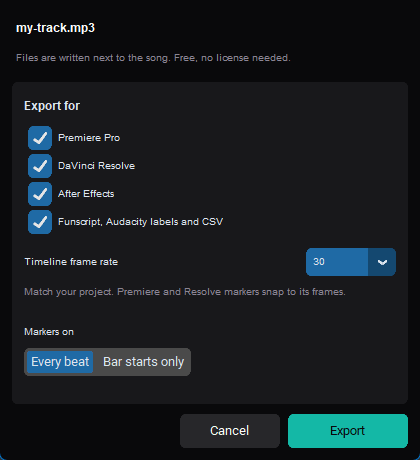
- Tick your editor, set your timeline's frame rate, and choose Every beat or Bar starts only.
- Import: Premiere Pro and Resolve open the
.xmlas a sequence with your song and its markers; After Effects runs the.jsxon your song's layer.
Every marker is named by bar and beat, so the timeline tells you where the drop is. Markers sit on whole frames at the rate you choose, so they line up with your cuts. It's free in the demo, on any song you have.
When You'd Rather Not Cut by Hand
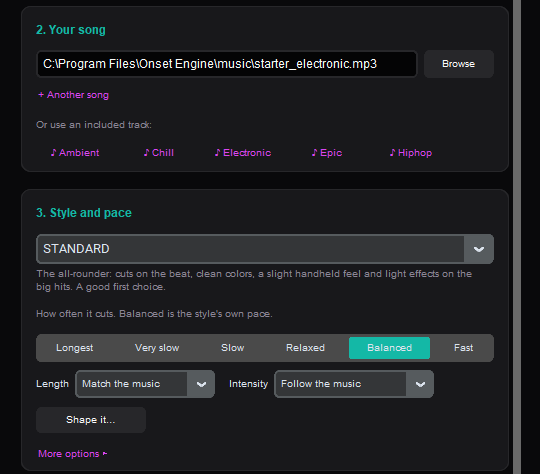
Markers make a hand-made edit faster. Onset Engine can also make the edit itself:
- Audio analysis - beats, bar starts, energy and the song's sections
- Visual analysis - the AI learns what's in every clip in your library
- Matching - high-energy clips on the drop, calm clips in the intro
- Assembly - every cut on the beat, with beat-triggered effects
- Output - render the video, or on Studio export an
.otiotimeline to finish in Premiere Pro or Resolve
Edits start at $29.99 one-time (Core). No subscription, and nothing leaves your PC.
When BeatEdit Is the Better Fit
BeatEdit has been placing beat markers in Premiere Pro for years and runs as a panel inside it, so you never leave your project. If you edit on a Mac, or you want beat detection without switching to another app, it's the more direct choice. Onset Engine is a Windows app: you export the markers once per song and import them.
Frequently Asked Questions
Are Onset Engine's beat markers really free?
Yes. Beat marker export works in the free demo with no purchase. The demo's watermark only applies to rendered videos, not to marker files.
How do I get the beat markers into Premiere Pro?
Click ⇩ BEATS on your song in the AUDIO tab, tick Premiere Pro, and choose your timeline's frame rate. Then use File > Import in Premiere Pro and pick the .xml file. It opens as a new sequence with the song on the first audio track and a marker on every beat.
Does it work with DaVinci Resolve and After Effects?
Yes. For Resolve, use File > Import > Timeline and pick the .xml: it opens as a timeline with your song and its markers. For After Effects, select the song's layer and run the .jsx file from File > Scripts > Run Script File.
Can I mark only the first beat of each bar?
Yes. Choose Bar starts only in the export dialog for one marker per bar, or Every beat for all of them. Markers are named by bar and beat, like 12.3 for the third beat of bar 12.
Does Onset Engine run on Mac?
Onset Engine runs on Windows. The marker files are plain files you can carry to a Mac; Premiere Pro will ask you to locate the song when you import the .xml.
Do I need Premiere Pro?
No. Onset Engine also exports markers for DaVinci Resolve, which is free, and it can render finished beat-synced videos on its own.
Ready to Try a Different Approach?
One-time purchase. No subscription. 100% local. All your footage stays on your machine.