Beat Sync Without the Plugin Tax
Plugins trap you inside an Adobe subscription and slow down your timeline. Onset Engine is a standalone, GPU-accelerated app. It builds the timeline for you using AI, then exports a .otio file so you can finish the grade in DaVinci Resolve - no Adobe required.
The Plugin Problem
BeatEdit for Premiere Pro costs $99.99, and it runs inside Premiere Pro, which needs a Creative Cloud subscription.
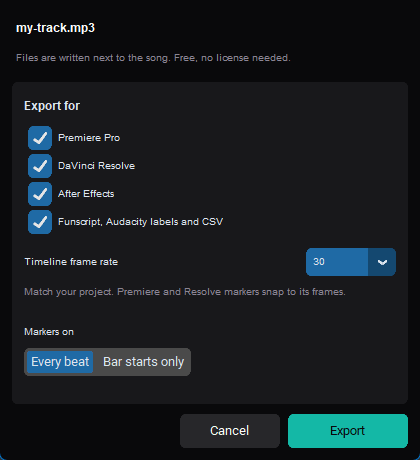
Premiere Composer is free but keeps you inside Adobe's ecosystem. Beat-sync plugins all depend on a subscription host application to function. There are BeatEdit alternatives that don't lock you in - Onset Engine's demo exports beat markers for Premiere Pro, Resolve and After Effects for free.
Beat detection shouldn't be a subscription line item. The analysis takes seconds on a modern CPU.
Standalone. No Host App Required.
Onset Engine is a standalone executable. It doesn't run inside Premiere, Resolve, or any NLE. It runs on its own - analyzing audio, understanding footage, and building timelines independently.
When it's done, it exports an OpenTimelineIO (.otio) file. Drag that into DaVinci Resolve, Premiere, or any OTIO-compatible NLE. Your clips are pre-placed, beat-synced, and ready for color grading. No plugin conflicts, no ExtendScript crashes, no "effect not found" errors.
- ✓ No Adobe Subscription: Onset Engine runs independently. Use DaVinci Resolve (free) for the final grade
- ✓ No Plugin Compatibility Issues: It's not a plugin - it can't conflict with your other extensions
- ✓ AI-Powered Selection: Doesn't just sync cuts to beats - it picks the right clips semantically
- ✓ Contrastive Scoring: Measures tier specificity, not just absolute similarity. Tier 1 actually gets calm clips, not the AI's highest-confidence content
- ✓ OTIO Export: Industry-standard timeline interchange format. Works with Resolve, Premiere, Avid, and more

The Professional Workflow
Ingest in Onset Engine
Point at your footage folder. The AI analyzes every clip. Motion scores, visual fingerprints, scene types, and moods - all computed locally on your GPU.
Load Your Track
Onset Engine maps beats and energy. The driver system assigns clip tiers to musical intensity. The entire timeline is built mathematically. Learn more in our guide on how to sync video to music automatically.
Generate Timeline
Review the AI-proposed timeline in the Editor. Lock clips you like. Re-roll the rest. Or keep New video's full-song draft as it is.
Export OTIO
One click. The .otio file drops into DaVinci Resolve with clip references, in/out points, and beat-synced positions. Grade it. Ship it.
What About BeatEdit?
BeatEdit places beat markers on your Premiere timeline, and you cut to them by hand. If markers are all you need, Onset Engine's free demo exports them too - for Premiere Pro, DaVinci Resolve and After Effects, named by bar and beat. See how to add beat markers.
Beyond markers, Onset Engine does the full pipeline: audio analysis + visual analysis + semantic selection + timeline assembly + rendering + OTIO export. It replaces the rough-cut workflow, not just the beat-marking step.
And when you're done with the rough cut, you hand off to your NLE via OTIO for the grade. Best of both worlds. No vendor lock-in.
Frequently Asked Questions
Do I need an Adobe Creative Cloud subscription to use Onset Engine?
No. Onset Engine is a standalone application that runs independently of any NLE. It builds beat-synced timelines on its own and exports OTIO files that you can import into DaVinci Resolve (free) or any OTIO-compatible editor. No Adobe subscription required.
How is Onset Engine different from BeatEdit for Premiere Pro?
BeatEdit places beat markers inside Premiere Pro. Onset Engine exports beat markers for Premiere Pro, DaVinci Resolve and After Effects free in its demo, and also handles the full pipeline: audio analysis, AI visual understanding, semantic clip selection, timeline assembly, rendering, and OTIO export (Studio).
What is the OTIO export format and which editors support it?
OpenTimelineIO (OTIO) is an industry-standard timeline interchange format. Onset Engine exports .otio files with clip references, in/out points, and beat-synced positions. It works with DaVinci Resolve, Premiere Pro, Avid, and other OTIO-compatible NLEs.
How much does Onset Engine cost compared to Premiere Pro plugins?
Onset Engine is a one-time purchase at $29.99 (Core) or $59.99 (Studio) with no recurring fees. By comparison, BeatEdit for Premiere Pro costs $99.99 and runs inside Premiere Pro, which needs a Creative Cloud subscription. Onset Engine's beat marker export is free in the demo.
Ready to Try It?
Download the free demo and see the results on your own footage. One-time purchase, no subscriptions.