Make Car & Phonk Edits That Hit on Every 808
Car meets, JDM builds, drift replays, dashcam rollers - drop your clips and a phonk track into Onset Engine, hit the AGGRESSIVE preset, and it snaps impact-zooms and 1-frame flashes to every 808 kick automatically. No five hours of keyframing shakes in After Effects.
The Problem
You've got 40GB of footage - car meet clips off your phone, JDM roll shots, dashcam pulls, or Assetto Corsa drift replays. You want that viral phonk car edit: surgical bass-synced shakes, 1-frame flashes on every 808 kick, cold desaturated grade. The aesthetic that gets 2M views on TikTok.
The reality? You're spending 5–8 hours in After Effects manually keyframing camera shakes, placing chromatic aberration on each snare, and nudging every cut to land on the right beat. You know the formula. The bottleneck isn't creativity - it's data entry. Our step-by-step guide shows you exactly how to make a phonk car edit in a fraction of the time.
The AGGRESSIVE Preset
Onset Engine's AGGRESSIVE preset was designed for exactly this aesthetic. Very fast cutting - about three times as many cuts as Standard, with extra quick cuts between beats on the hits. 6% impact zoom on every kick with 18.0 fast-decay snap-back. Chromatic aberration fires only on beats. Flash decay at 120ms - blink and you miss it.
- ✓ 808 Sync: The audio engine locks to the beat grid and bass energy - the 808s. Cuts snap within ±200ms of each onset
- ✓ Impact Zooms: 6% punch-and-decay on every detected bass hit - the classic Phonk camera shake
- ✓ Chromatic Aberration: 2.5px CA fires on heavy beats only - not constant, not random, mathematically placed
- ✓ 1-Frame Flashes: 120ms decay white flash on snares. Subliminal. Just like the edits that go viral
- ✓ Desaturated Grading: a muted, high-contrast grade that drains even more color on the heaviest beats - the cold, cinematic drift look
The Workflow
Ingest Your Car Footage
Point Onset Engine at your clips - phone footage from the meet, roll shots, dashcam pulls, or Assetto Corsa replays. The AI analyzes every frame and knows the difference between a hard drift angle and a parking-lot idle.
Drop the Phonk Track
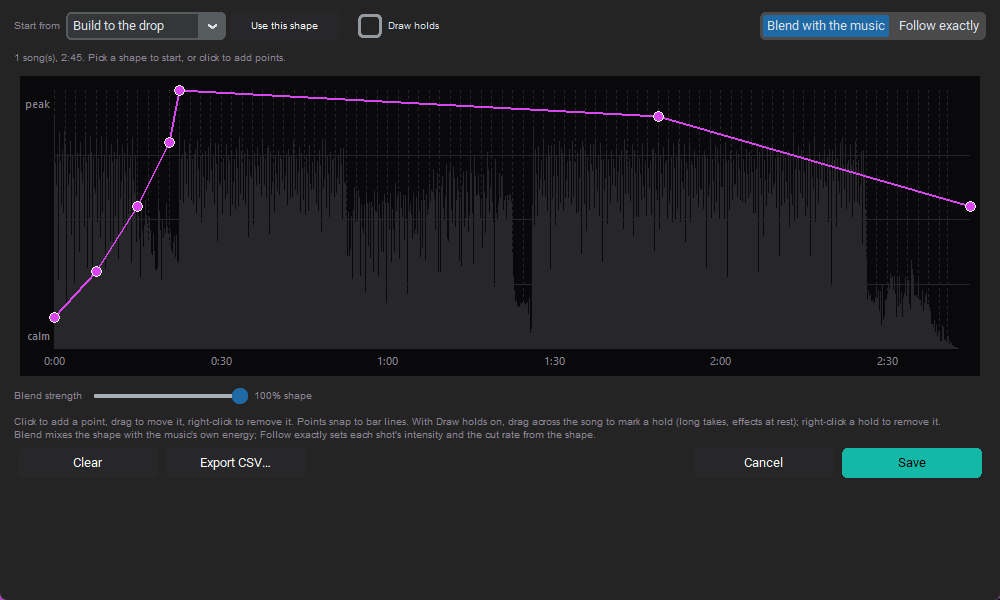
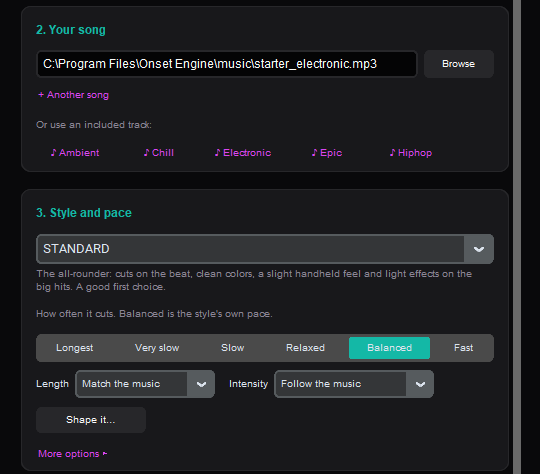
Load your Cowbell, Memphis, or Drift Phonk track. Onset Engine decomposes it into beats, 808 kicks, energy curves, and drop zones automatically.
Select AGGRESSIVE
Very fast cuts, impact zooms, chromatic aberration, rapid flashes, stutters - all auto-configured. Or tweak the preset JSON yourself.
Export or DJ It Live
Render to MP4 with NVENC hardware encoding, or launch DJ Mode and mix your drift footage live to the Phonk track in real-time.
Why Not After Effects?
After Effects is a compositing tool. You're using it as a beat-sync calculator. That's like using Photoshop to crop thumbnails - technically possible, strategically absurd.
Onset Engine does the math: beat detection maps the audio → the AI understands the footage → the driver system maps intensity to visuals → AGGRESSIVE applies the aesthetic. You supply the taste. The engine supplies the labor.
And because it runs locally on your GPU, you're not uploading 40GB of replay footage to anyone's cloud server. Your renders stay on your NVMe. Your footage stays in your library. The same engine powers our gaming video editor for fragmovies and esports montages.
Frequently Asked Questions
How do I make a car edit?
Drop your car footage - phone clips from a meet, roll shots, dashcam pulls, or sim replays - into Onset Engine along with a phonk track. The AI analyzes every frame, maps the beats and 808 kicks in your music, and assembles a beat-synced edit with impact-zooms and flashes automatically. Pick the AGGRESSIVE preset for the classic phonk car look, then export to MP4. No manual keyframing required.
What VFX does the AGGRESSIVE preset apply for phonk drift edits?
The AGGRESSIVE preset fires 6% impact zooms with 18.0 fast-decay snap-back on every detected bass hit, 2.5px chromatic aberration on heavy beats, 120ms white flash decay on snares, stutters and motion streaks on the biggest hits, and a muted, high-contrast grade, with about three times as many cuts as Standard, with extra quick cuts between beats on the hits. All effects are mathematically synced to the audio.
Can I use Assetto Corsa replay footage with Onset Engine?
Yes. Point Onset Engine at your Assetto Corsa replay folder and the AI analyzes your footage. It distinguishes between drift entry angles, high-speed cornering, and idle footage, automatically selecting the most dynamic moments for your edit.
Do I need After Effects to make phonk drift edits?
No. Onset Engine is a standalone application that handles the entire pipeline: AI beat detection, AI visual analysis, beat-synced timeline assembly, VFX application, and NVENC hardware rendering. No After Effects, no plugins, no subscription required.
Can I preview my phonk edit in real-time before rendering?
Yes. DJ Mode lets you mix your drift footage live to the phonk track in real-time with beat-synced transitions. You can star your favorite clips, block weak ones, and then use those ratings to improve the final rendered output.
Ready to Try It?
Download the free demo and see the results on your own footage. One-time purchase, no subscriptions.