Live, Beat-Synced Visuals for DJs & Streamers
Beat-reactive visuals without a second operator or a $399 Resolume rig. Load your set's track and your clip library - Onset Engine's DJ Mode drives AI-selected visuals locked to the beat grid while you steer the energy live from the keyboard. All running locally on your laptop.
The DJ Visuals Problem
Most DJs either skip visuals entirely, loop the same generic content, or hire a VJ to run Resolume alongside them. None of these scale. Generic loops look amateur. A dedicated VJ doubles your costs. And running Resolume yourself while mixing is nearly impossible.
What you actually need is audio-reactive VJ software that drives beat-locked visuals from AI, not by hand - so you get pro visuals without a second operator or a $399 Resolume license.
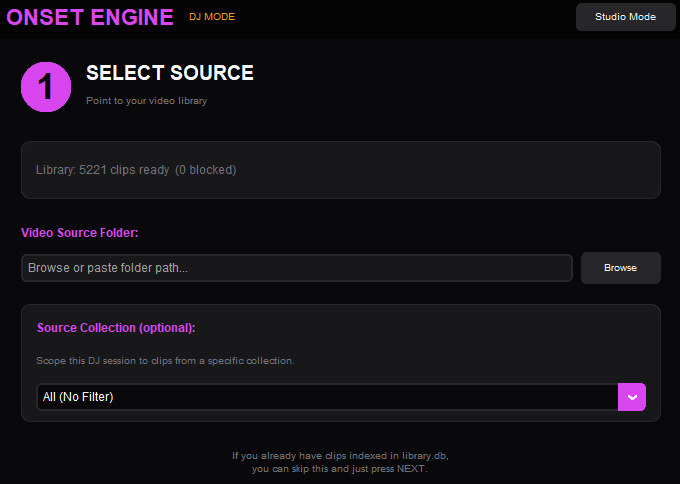
That's exactly what Onset Engine's DJ Mode does. Load your visual library and the track you're playing, hit play, and the AI handles clip selection, transitions, and beat-sync - while you steer the energy live from the keyboard.
How DJ Mode Works
- ✓ Beat-Locked Visuals: Beat detection maps your track's beats, drops, and energy curve, then the engine drives clip selection and transitions live in sync - every cut lands dead-on the beat, no drift
- ✓ Automatic Clip Selection: Visual AI matches clips to the current musical energy. High-intensity clips for drops, ambient visuals for breakdowns
- ✓ Gapless Playback: MPV-powered hardware-decoded playback with zero gaps between clips. Transitions are seamless, not jarring
- ✓ Live Keyboard & Text Steering: Override the AI any moment - lock a visual, bias the energy, hype a drop, or type a text prompt to pull up matching clips on the fly, all without touching a mouse
- ✓ Zero Internet: Runs entirely on your laptop. No cloud dependency means no lag, no dropouts, and no reliance on venue Wi-Fi

DJ Visuals Workflow
Build Visual Library
Collect your visuals - abstract loops, 3D renders, stock footage, AI-generated content. Ingest once, the AI indexes everything.
Load Your Track
Load the track (or set mix) you're playing. Onset maps its beat grid, drops, and energy curve in seconds - the blueprint that drives the visuals.
Launch DJ Mode
Hit play. The AI selects and transitions between clips in sync with the track. Every beat, drop, and breakdown triggers the right visual - and you steer it live.
Output to Screen
Send the visual output to a projector, LED wall, or second monitor. Full-screen, hardware-accelerated, zero latency.
Visuals Without a VJ
Resolume Arena costs $399+ and requires a dedicated operator. Free VJ tools look cheap. Hiring a VJ for every gig isn't sustainable for most DJs.
Onset Engine gives you professional, beat-reactive visuals that run autonomously. Build your visual library with content that matches your brand, and the AI handles the rest. Different sets, different energy, different visuals - all from the same source material. You can even use it to create polished nightclub event recap videos after the show.
$59.99 one-time purchase. No subscription, no per-gig fees. Runs on any laptop with a decent GPU. Your visuals, your hardware, your control.
Note: DJ Mode drives visuals from the track you load - ideal for streamers, parties, and pre-planned sets. Locking visuals to a fully improvised live mix (via Ableton Link) is on the roadmap as Onset Live.
Frequently Asked Questions
What software do DJs use for visuals?
Resolume Arena ($399+) is the industry standard, requiring a dedicated VJ operator. Onset Engine's DJ Mode offers AI-driven visuals locked to the track you load - no second operator needed. Load your visual library and a track, and the beat grid drives clip selection and transitions while you steer live from the keyboard.
Is there free VJ software?
Open-source options like OBS can display visuals but lack beat-reactive AI. Onset Engine offers a free demo to test DJ Mode with your own visuals and audio. The full version is a one-time $59.99 purchase - compared to Resolume's $399+ license plus update fees.
How to make visuals for DJ sets?
Collect visual content (abstract loops, 3D renders, AI-generated clips, stock footage) and import it into Onset Engine. The AI analyzes everything and indexes it by what's on screen. During your set, DJ Mode automatically selects and transitions between visuals in sync with your audio output.
Does Onset Engine follow my live DJ mix?
DJ Mode drives visuals from the track you load into it - it maps that track's beat grid and syncs AI-selected clips to it, which you steer live from the keyboard. It does not yet listen to an external live audio feed and follow an improvised mix; that capability (via Ableton Link) is planned as the separate Onset Live product. For streamers, parties, and pre-planned sets where the track is known, DJ Mode works today.
Ready to Try It?
Download the free demo and see the results on your own footage. One-time purchase, no subscriptions.