Twitch Clip Editor - Turn VODs into Beat-Synced Montages
Don't pay an editor $100 to scrub through your 6-hour VOD. Onset Engine's AI finds the high-action moments and syncs them to EDM drops automatically.
The Streamer's Problem
You streamed for 6 hours. The chat popped off during three insane clutch plays. But finding those moments in a raw VOD means scrubbing through hours of farming, loading screens, and dead air.
Hiring a clip editor costs $100+ per highlight video. Cloud-based AI tools require uploading 50GB+ of raw footage. And CapCut's auto-edit doesn't understand what a "clutch round" looks like. What you need is a dedicated gaming video editor that understands action.
How Onset Engine Solves This
Onset Engine's AI doesn't just look at motion levels - it semantically understands what's happening on screen. Using AI visual analysis, it distinguishes between "player running through empty hallway" and "multi-kill fragfest with effects and explosions."
- ✓ Motion Scoring: Every clip gets a 0.0–1.0 dynamic content score - static menus, loading screens, and idle moments are naturally ranked lowest
- ✓ Semantic Edge: Visual understanding means the AI can tell "sniper headshot" from "walking through spawn" - not just "lots of pixels moving"
- ✓ Audio Ducking: Voice activity detection automatically lowers the music during your commentary, keeping callouts and reactions audible
- ✓ Energy Mapping: Calm gameplay gets chill sections. The frantic ace clutch lands on the drop
The Workflow
Import VODs
Point Onset Engine at your recordings folder. The AI ingests and indexes every frame - no upload, no cloud, runs locally.
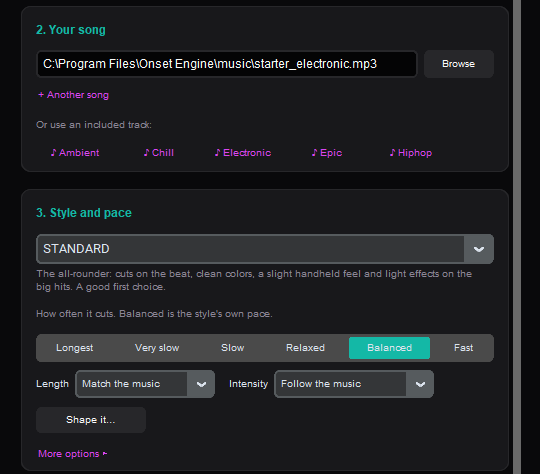
Drop Your Track
Choose an EDM, Lo-Fi, or Phonk track. Onset Engine maps beats, energy, and drops to create a pacing blueprint. See the full walkthrough in our gaming montage editing guide.
Choose a Preset
AGGRESSIVE for fragfests. STANDARD for chill compilations. Pick a vertical format for Shorts and TikTok.
Export or Go Live
Render to MP4, export to your NLE via OpenTimelineIO, or launch DJ Mode to live-mix your clips at your next stream.
Why Not Cloud Alternatives?
Tools like Eklipse or Opus Clip require uploading your entire stream to their servers. That takes hours on most internet connections, costs money per hour of footage processed, and means your raw gameplay sits on someone else's server.
Onset Engine runs entirely on your machine. Your footage never leaves your SSD. And because it uses hardware acceleration when available, even 4K footage processes in minutes, not hours.
Frequently Asked Questions
How does Onset Engine find the best moments in a long VOD?
Every clip gets a motion score from 0.0 to 1.0, and AI visual analysis lets the engine distinguish high-action moments from idle gameplay. Static menus, loading screens, and dead air are automatically ranked lowest.
Do I need to upload my VODs to a cloud service?
No. Onset Engine runs 100% locally on your machine. Your footage never leaves your SSD, and NVENC hardware acceleration processes even 4K footage in minutes without any upload wait time.
Can I use Onset Engine for live streaming visuals?
Yes. DJ Mode provides live beat-reactive visuals that you can use during streams. You can also render pre-made montages offline and use them as stream overlays or intermission content.
What export options are available for gaming montages?
You can render directly to MP4 with NVENC hardware encoding, export 9:16 vertical video for TikTok and YouTube Shorts with face-tracked Smart Crop, or export an OTIO timeline to Premiere Pro or DaVinci Resolve for further editing.
Ready to Try It?
Download the free demo and see the results on your own footage. One-time purchase, no subscriptions.