Music Montage Shorts - Vertical, Beat-Synced, Automatic
Turn your footage into vertical Shorts that actually hit - beat-synced montages, not chopped clips. Onset Engine picks the best moments, cuts them to the music, and crops to 9:16 automatically. Batch-render a week of Shorts from one library.
A Short Is a Tiny Montage
The Shorts that pop aren't slideshows - they're beat-synced micro-montages: the best moments cut to the music, in 9:16. Building one by hand means you have to:
- - Find the most engaging moments across a pile of footage
- - Cut them to the beat so the Short feels dynamic, not chopped
- - Crop 16:9 to 9:16 while keeping the action in frame
- - Repeat it for every Short you publish - ideally several a week
Manual reframing and beat-matching in Premiere takes 20–30 minutes per Short. Cloud tools charge per minute and require uploading all your footage. Neither scales to the volume the algorithm rewards.
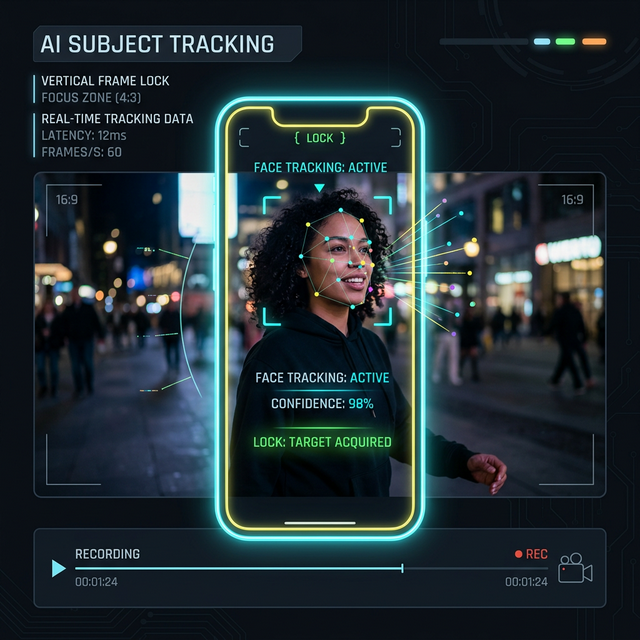
Smart Crop + Beat-Sync for Shorts
Onset Engine combines two systems that make YouTube Shorts creation fast:
- ✓ Smart Crop: Face tracking keeps subjects centered in the 9:16 frame automatically - no manual keyframing
- ✓ Beat-Synced Cuts: Beat detection maps every beat in your music track. Cuts land on musical accents for a dynamic, professional feel
- ✓ AI Clip Selection: Visual AI and motion scoring rank clips by relevance and motion, filtering static and low-motion footage - the best moments surface automatically
- ✓ Triptych Mode: Generate 3-panel side-by-side vertical layouts for the viral multi-view format
- ✓ Batch Rendering: Queue multiple Shorts with different tracks and render them all overnight
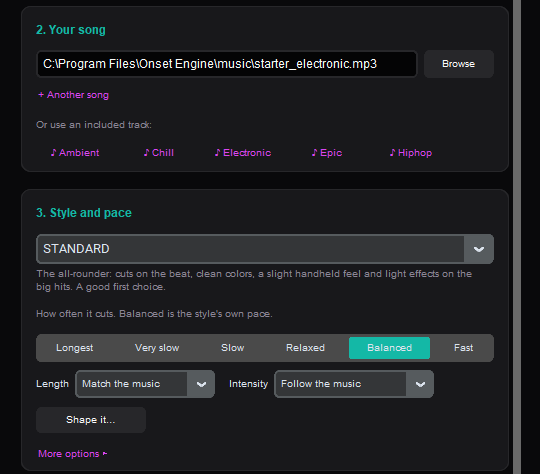
YouTube Shorts Workflow
Import Footage
Point Onset Engine at your video library. The AI indexes every frame, scoring motion and semantic content.
Choose Music
Select a track. The audio engine maps beats, energy curves, and sections - your Shorts will cut to the rhythm automatically.
Enable Smart Crop
Set output to 9:16. Face-aware cropping keeps subjects centered. No manual reframing needed.
Batch Export
Render multiple Shorts in one session. Different tracks, different clip selections - each unique. Upload-ready.
Scale Your Shorts Output
YouTube's algorithm rewards consistent daily publishing. But creating one Short per day manually means 30+ hours of editing per month - just for Shorts.
With Onset Engine, build your clip library once (gameplay, B-roll, edits, recordings) and use New video to make a beat-synced draft for each new track - pick the song, a style, and a pace, and it cuts the whole song to the beat. Each new track produces a different montage from the same source material.
$59.99 one-time purchase. No per-render fees. No cloud upload. Your footage stays on your machine, and your GPU does the work.
Frequently Asked Questions
What is the best editor for YouTube Shorts?
It depends on your workflow. For manual editing, CapCut and Premiere Pro are popular. For automated, beat-synced Shorts from existing footage, Onset Engine generates vertical videos with AI face tracking and music-driven cuts - no manual reframing needed.
What video size is best for YouTube Shorts?
YouTube Shorts require 9:16 vertical video (1080x1920 pixels). Onset Engine's Smart Crop automatically converts 16:9 landscape footage to 9:16 with face-aware framing, so subjects stay centered without manual keyframing.
Can I edit YouTube Shorts for free?
YouTube has a built-in Shorts editor for basic trims. Onset Engine offers a free demo to test its AI-powered Shorts generation from your own footage. The full version is a one-time $59.99 purchase - no subscription, no per-video fees.
Does YouTube have a built-in Shorts editor?
Yes, YouTube offers basic trimming and captioning tools. For beat-synced editing, AI clip selection, face-tracked cropping, and batch rendering of multiple Shorts from a footage library, a dedicated editor like Onset Engine handles what the built-in tool can't.
Ready to Try It?
Download the free demo and see the results on your own footage. One-time purchase, no subscriptions.